

Appearance
Managed PMO: a weekly report delivered
Managed PMO helps a PMO team collect project facts, make gaps visible, independently review a weekly portfolio pack and issue it to authorised readers. The customer receives the reviewed report, requested decisions and accountable follow-up. Agree the service scope, staffing, cadence and commercial terms separately.
Open Managed PMO in the Governance navigation. The current engagement supports one workspace and up to ten included projects. The screen and its actions follow the permission matrix; it is not available equally to every member.
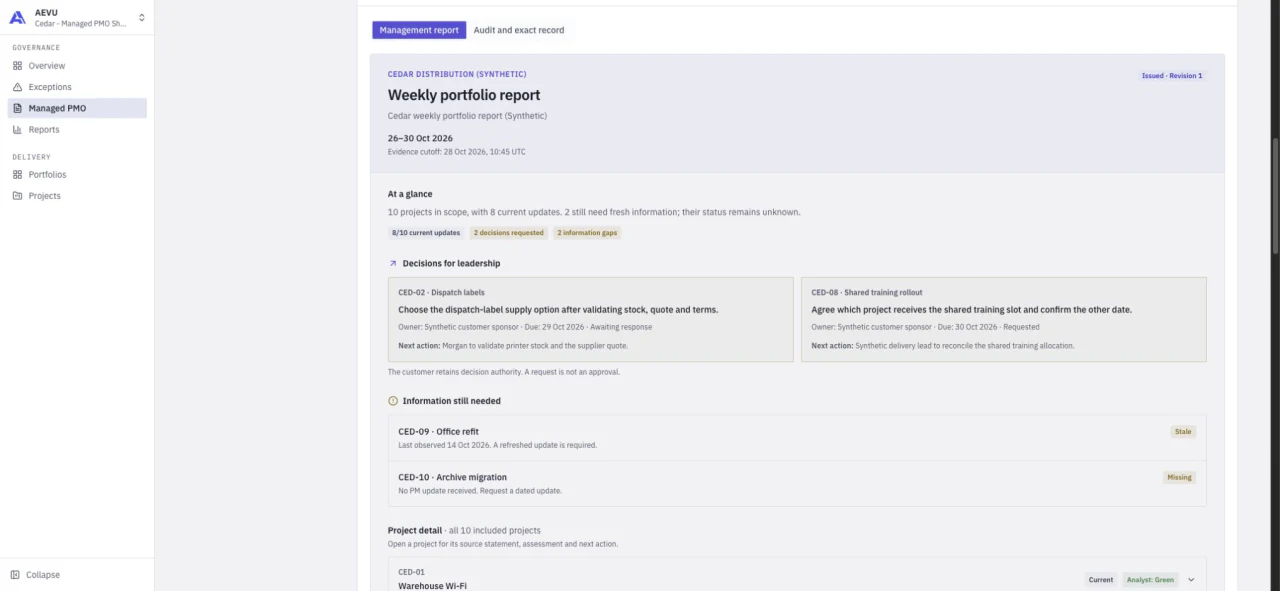
Actual hosted application capture, 28 October 2026. Cedar Distribution and its project data are fictional demonstration material, not a customer case study.
Who does what
| Responsibility | Work and access |
|---|---|
| Customer / report reader | Reads issued packs and decisions. Needs reports.view and current access to every included project. A report-only reader cannot see working drafts. |
| PMO analyst / operator | Sets up the engagement, collects and reconciles updates, records actions/decisions and prepares the pack. Also needs watch.manage. |
| Independent reviewer | Approves the exact prepared revision or returns it with remarks. Also needs document.approve, complete project access and independence from the contributors. |
| Authorised publisher | Issues the reviewed revision with document.approve; AEVU rechecks the original reviewer's access and independence. |
Roles are editable; job titles or displayed owner names do not grant rights. Anyone who created, updated or prepared the cycle counts as a contributor, even if their input was later replaced. They cannot approve that cycle. Read-only plan standing blocks changes.
Run the reporting cycle
1. Set up the engagement
The operator selects Set up an engagement, names the customer engagement and chooses the native projects that belong in the report. Keep the agreed roster explicit. Every included project must be visible to the staff member operating on it.
Use the engagement queue to see which current periods need collection, review or issue. A reader's queue does not reveal customer-hidden drafts.
2. Start a reporting cycle
Select Start reporting cycle, then enter the reporting period and evidence cutoff. The cutoff identifies the reporting basis; it does not make a late observation historical evidence. Keep the source observation date and recorded capture time distinct.
3. Collect and reconcile the facts
For each project record the PM statement, observation date, analyst assessment, next action and any customer decision request. Give actions/decisions an accountable owner and due date where known. Names are display labels, not invitations or permissions.
The coverage view keeps current, stale and missing information visible. Missing data stays unknown. A project with current information is not necessarily healthy. Source PM statements, analyst RAG and native AEVU health/progress have separate meanings.
The charts include accessible values and drilldowns to the projects behind a category. Use the follow-up board to inspect overdue, awaiting-response, due-soon, later, undated and completed items. A resolved decision keeps its recorded outcome in the history.
4. Prepare the weekly pack
Select Prepare weekly pack when the roster and recorded gaps are ready for review. Preparation captures the report source, version and fingerprint. Review the Management report and Audit and exact record views.
Changing contributing inputs invalidates preparation/review; prepare again before asking for fresh approval. A version-conflict message means another update won the save: reload and reconcile rather than assuming your change was kept.
5. Review independently
A different authorised person checks the exact prepared pack, its evidence basis, gaps, decisions and intended audience. They approve it or return it with remarks for correction. Approval does not let an AI client or service operator decide the customer's business question.
6. Issue and read back
The publisher confirms issue of the reviewed revision. The customer can then open the issued management report, inspect the full project detail and download the text or PDF, or print the complete report.
The fingerprint identifies the reviewed source text. The PDF is a presentation derived from that checked source; its file bytes have a different hash. Access is rechecked at read/download time. Issue makes the pack available inside AEVU; it does not send an email or message automatically.
Corrections and comparison
An issued pack is not edited in place. Start a correction or a new cycle, explain the changed facts, prepare again and obtain independent review/issue. The original issued bytes remain retained.
Compare with the authorised correction parent or a prior issued period. Differences distinguish changed fields, source basis and roster changes. Missing/unavailable history is not treated as an unchanged result.
For prepared and issued reports, follow-up timing uses the report's recorded cutoff basis; a historic report does not silently age into a new status. Read the dates shown before acting on a list.
Read the report through an AI client
A personal MCP connection with Issued PMO reports and decisions (pmo.read) can discover permitted issued packs, read the complete text in chunks and retrieve decision requests. It still requires current access to the full included project roster. It cannot read the working PMO draft, approve or issue the report, record outcomes or send messages.
What the workflow does not promise
The current pack is prepared from human-entered updates and native records. It does not automatically chase project managers, generate source statements with a model, approve decisions, schedule delivery, send the report or collect payment. The PMO team operates the service and validates the evidence. Ari and external AI clients have separate capabilities and policies.
The synthetic showcase proves an implemented workflow, not an actual paid pilot, independent human operating acceptance, a delivery-health certification or a guaranteed customer outcome.
If something is unavailable
- Managed PMO is missing: check
reports.viewand the selected workspace. - The engagement or issued pack is missing: check current visibility of every included active project. Partial project access cannot read the whole pack.
- You cannot approve: confirm
document.approve, independence and the current prepared version. - Issue asks for fresh review: contributing data, version, hash or the reviewer's current source access changed. Reconcile and obtain a fresh review.
- The report has stale/missing information: resolve the gap with its owner; do not relabel it as current without evidence.
See Reports, permissions, MCP tools and troubleshooting.