

Appearance
Security and data protection
What AEVU does to protect your data, and what you control.
Signing in
- Email and password. Five wrong passwords lock the account for 15 minutes. The same counter covers the sign-in form and the change-password form, and sign-in attempts are also rate limited.
- Microsoft Entra ID. Platform sign-in uses only a linked work/school identity, with no email matching or account creation. A company connection separately supports directory routing and optional provisioning, set up by a workspace administrator (Entra ID). Browser-bound so a forged callback cannot complete.
- Google. Optional and link-only: a person links Google from Profile, and only that identity can then sign in. AEVU never matches by email or creates accounts from Google (Google).
- Multi-factor authentication. AEVU's own end-user sign-in does not offer MFA. If your company requires MFA, enforce it in your Microsoft or Google account and use single sign-on. The AEVU operators' own console does require MFA.
- Linking Google or a platform Microsoft account requires a recent sign-in (within 10 minutes by default).
Sessions
If Keep me signed in on this device is ticked at sign-in the session is shared by the browser; otherwise each tab keeps its own session. Changing or resetting a password ends every other session of that account (the device you changed it on stays signed in). Unlinking Microsoft or Google ends every session, including the current one. An administrator's password reset for a person also signs them out everywhere. Deactivating a person stops access on their next request.
Tenancy isolation
Your organization's data is isolated from every other. Every request is checked against the workspaces you belong to; a workspace id sent by a browser is a request, never a fact. A project you cannot see answers exactly like one that does not exist. Archived workspaces cannot be reached by normal use. Read-only organizations cannot change data.
Roles and permissions
What a person can do is decided by their workspace role and organization role, checked on the server for every action (Roles, Permission keys). Hiding a button is never the only protection.
Audit
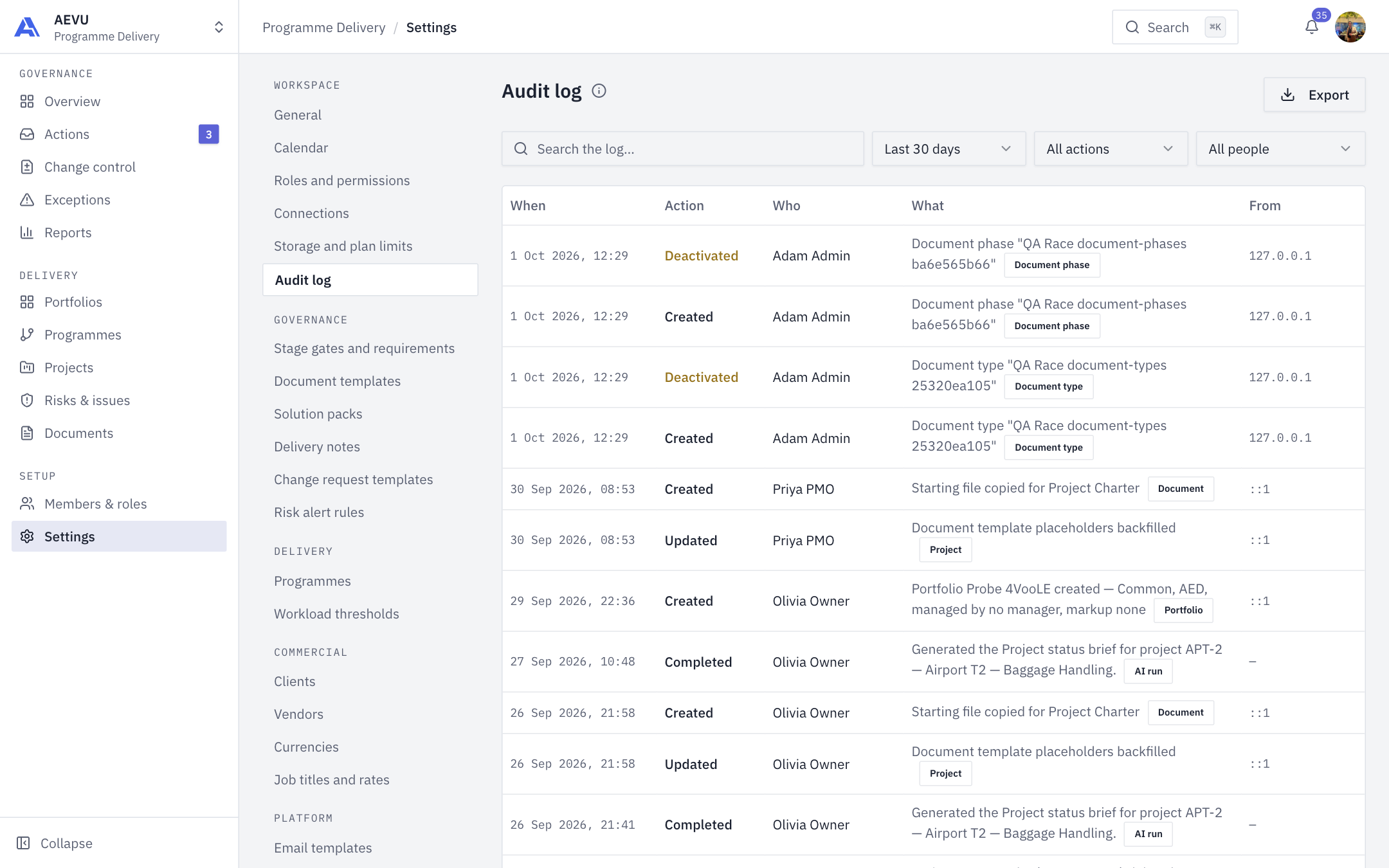
Actions in each workspace are recorded in an append-only Audit log (Settings → Audit log), written after the action succeeds, with the actor's name as it was at the time. Withdrawals (rejecting, un-approving) are logged as visibly as decisions. CSV export is capped at 5,000 rows. Organization decisions (policy, members, billing) go to a separate organization audit trail. Secrets, webhook addresses and file contents never appear in audit lines.
Uploads and files
- Documents are accepted from an allow-list of types (PDF, Word, Excel, PowerPoint, PNG, JPEG and text) and are served back with the content type for that extension, never the type the browser claimed.
- Stored files live outside the web root and are served only after access checks.
- Logos and avatars are checked by their content: JPEG, PNG, WebP or GIF; SVG logos (never avatars) are accepted only after being rewritten safely.
- Plan storage limits apply (Storage).
- Report exports are private to the requester and deleted after their retention period.
Secrets
Connection credentials (Entra, NetSuite, Google tokens, webhook addresses) are encrypted at rest with ASP.NET Data Protection and never shown again; the screen shows only a short hint. To change one, replace it. AEVU refuses to save a connection secret equal to your own AEVU password. Saving connection credentials is rate limited. Rotate secrets when a person who knew them leaves, and before any expiry date you recorded.
AI and your data
AI reads only the data categories your organization allows, only as the person asking, and keeps drafts private for a limited time. See AI budget, credits & privacy.
Responsibilities
| You | AEVU |
|---|---|
| Choose who is an Owner or Admin; review members and roles | Enforce permissions on every request |
| Record secret expiry dates and rotate secrets | Encrypt secrets; never show them again |
| Require MFA at Microsoft/Google if you need it | Keep sessions and lockout controls |
| Decide which integrations and AI data categories to allow | Check policy again at the moment of each action |
Not covered here
AEVU's physical hosting, backups and certifications are matters for your AEVU agreement and are not described in this manual.