

Appearance
Meet Ari
Ari is AEVU's AI assistant. It answers questions about your own records, drafts things for you to review, and opens the normal AEVU forms prefilled so that you make every change.
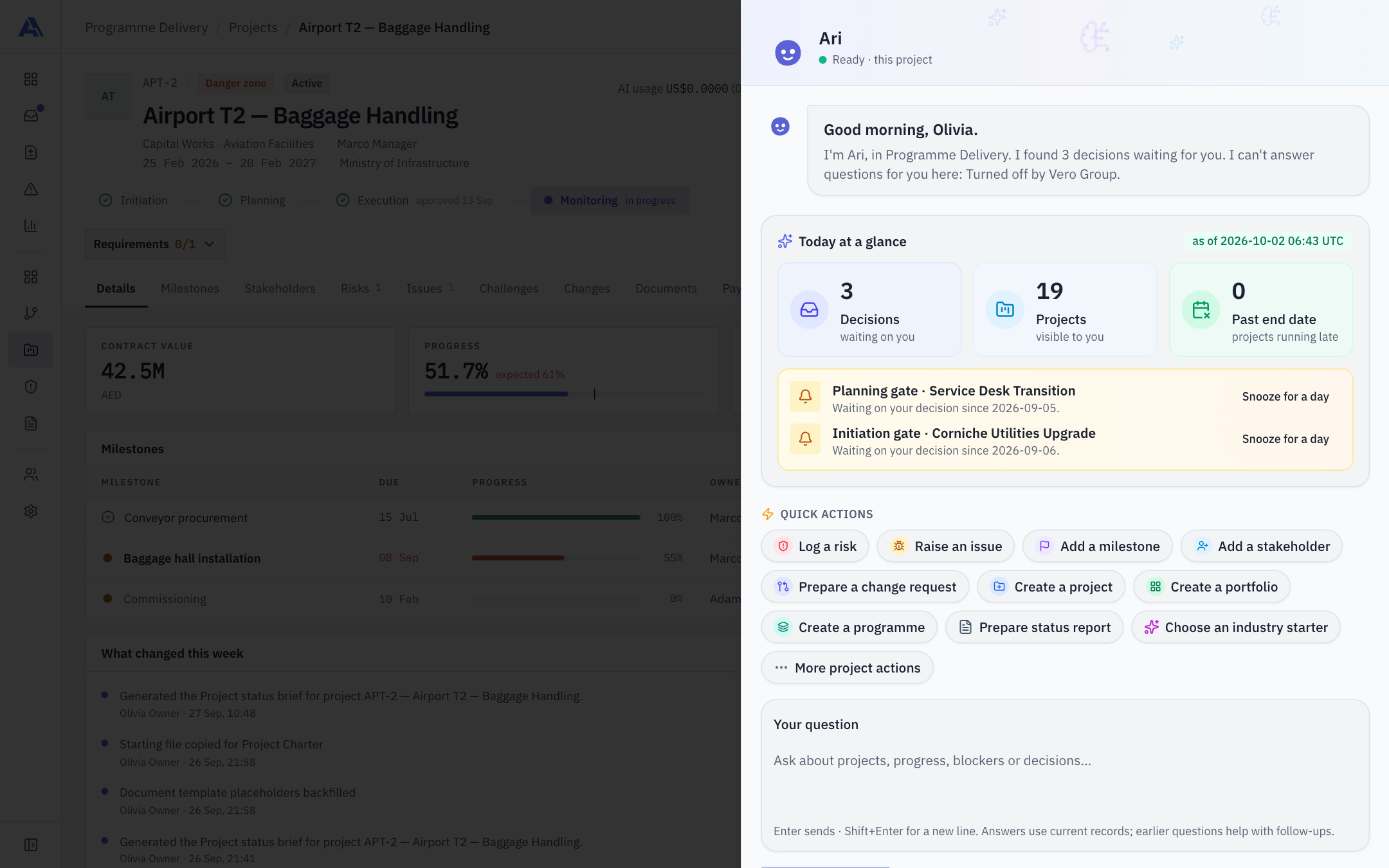
Open Ari
Select Ari's mark in the header, next to Search. The organisation area has the same entry. Press Enter to send and Shift+Enter for a new line. History and New chat are icons in the panel header.
When you open Ari it greets you with what is waiting for you, for example "I found N decisions waiting for you", with a Today at a glance summary, waiting items you can snooze, and Quick actions (for example Log a risk, Raise an issue, Prepare a change request). The panel shown here is open on a project. Suggestions can be snoozed for a day (remembered in the current browser).
Scopes: what Ari is looking at
| Scope | What Ari reads | Where |
|---|---|---|
| Workspace | Exact counts across every project you can see, plus a labelled sample of up to 40 projects. Can be narrowed to a portfolio or programme | Header |
| Project | That project's evidence pack | Inside a project |
| Report | The chart facts calculated for the report you are viewing | A report page |
| Organisation | The organisation's own settings screens: plan, AI policy and caps, integration policy, role holders, seats, spend, subscription, credits and invoices | Organisation area; Owners and Admins only |
Changing scope starts a fresh conversation, so an old answer never appears in a new scope.
What Ari can do
- Answer from your records, with citations. Every claim cites the record it came from; chips link to it. Sources are folded under "Sources".
- Look things up with read tools, as you. Up to three rounds of three lookups per question. Tools only appear when you hold the permission and the organisation allows the data. They cover: your own work and decisions waiting, finding projects, project details, exceptions, document metadata (never content), stakeholders (never email or phone), challenges, stage decisions history, payments summary (never profit or margin), portfolios and programmes, workspace settings screens, the audit log (never IP addresses), and your own notifications.
- Say what it could not verify, and refuse questions outside AEVU's data (weather, news, general knowledge).
- Propose changes that you confirm (below).
Confirmed actions: Ari proposes, you decide
Ari never writes anything on its own. A proposal opens the normal form, prefilled, in the conversation (with Open full form for more fields). You review and save, and the save goes through the same checks as any other.
| Kind | Examples |
|---|---|
| Create | Log a risk, raise an issue, add a milestone, add a stakeholder, raise a change request (draft only), create a project, portfolio or programme |
| Edit | Reschedule a milestone, update or close a risk, update or close an issue. The form shows the current record; if it changed since the answer, the save is refused |
| Open a screen for you | Submit a stage (opens the project's own submit dialog), export a report (opens its Export dialog), test a connection (points to Settings → Connections), change the organisation questions allowance or a workspace cap (opens Organization → AI with the amount typed in) |
A confirmed action leaves a receipt you can reopen. A retry never creates a duplicate.
What Ari cannot do
- Approve, reject or reopen a stage gate, change request or any decision. No request maps to one.
- Write without your confirmation, send emails, browse the web or run anything outside AEVU.
- Read anything you cannot see, or a data category your organisation has switched off.
- Assert numbers AEVU does not hold (for example utilisation, profit, uptime or revenue) unless the records name them.
Privacy of conversations
Conversations are private to you. Another member cannot see them. If your access or the organisation's policy narrows later, an old answer is withheld rather than shown with citations removed. Question text is cleared after the retention period set by your organisation (see AI budget, credits & privacy).
When Ari is unavailable
Ari needs: AI switched on by your organisation (with the processing notice acknowledged), a workspace allowance above zero, the Workspace assistant capability enabled, and the ai.use permission (Owner, PMO and Manager roles by default). For organisation questions, the organisation needs a non-zero organisation questions allowance. If a limit is reached you will see which one: organisation, workspace or project. See AI settings.