

Appearance
AI budget, credits and privacy
AI is metered. Every run is held against a budget before it starts, so nothing can overspend.
Credits
AI usage is measured in credits. One credit equals US$0.001 of AI usage. Your plan includes a monthly number of credits (Starter 1,000; Team 5,000; Business 25,000; Enterprise negotiated). Included credits reset at the start of each UTC month.
During a trial the whole trial is capped at 500 credits (US$0.50), whatever the plan includes.
The budget ladder
A run must fit under every level that applies:
- Organisation monthly ceiling. Set from your plan's included credits. An Owner may raise it only up to what the plan allows.
- Credit top-up balance. Purchased credits (below). It is used only for what the included credits could not cover.
- Workspace monthly cap. Each workspace's own allowance. A cap of zero means AI is off for that workspace. Workspace caps plus the organisation questions allowance cannot exceed the ceiling.
- Project limit. Optional monthly limit per project. A project without one is tracked but not limited.
The organisation's pool is shared: one workspace can use it up and others will be refused.
Set the limits
| What | Where | Who |
|---|---|---|
| Ceiling, organisation questions allowance, workspace caps, data categories, retention, master switch | Organization → Ari (AI policy) | Owner or Admin (only an Owner may raise the ceiling) |
| Turn AI use cases on or off for a workspace; project limits | Settings → AI | ai.manage (Owner and Admin) |
| See usage | Settings → AI, and Organization → AI usage | ai.usage.view / any organisation role |
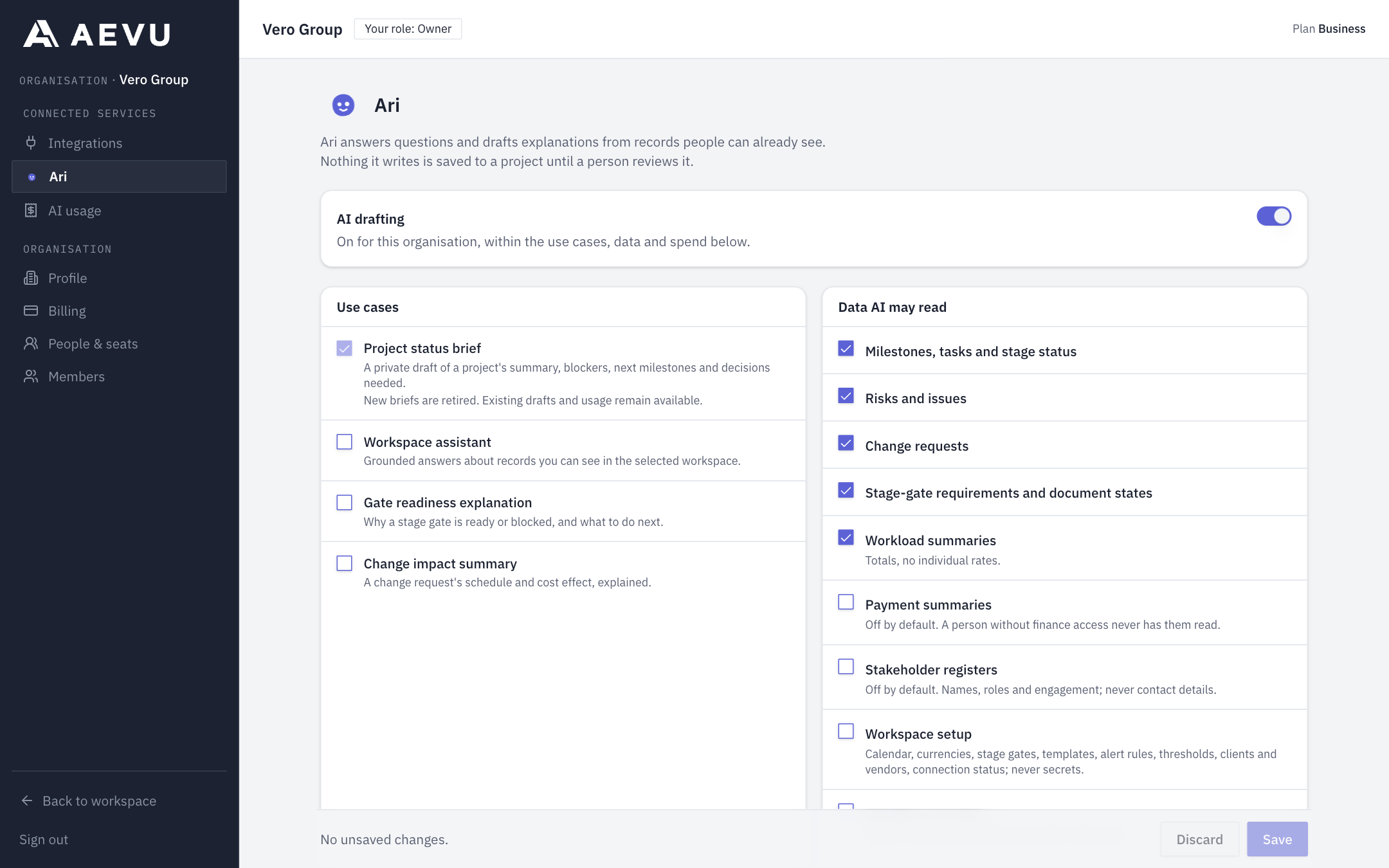
Turn AI on (organisation)
- Open Organization → Ari.
- Switch on AI drafting. The first time, read the processing disclosure (model profile, router, provider data use, region) and tick the acknowledgement.
- Tick the Use cases you want and the Data AI may read.
- Set Keep AI drafts for, the monthly ceiling, the organisation questions allowance, and each workspace's monthly cap.
- Save.
If someone else saved first you will be told to reload ("Somebody else saved this policy since you opened it").
Data categories
AI may read only categories your organisation ticks: schedule, risks, changes, gates, workload, setup, people, finance, stakeholders and audit. Finance, stakeholders and audit are off by default. Ari reads a record only as the person asking, so it never reveals more than they could see.
Top-ups: buying more credits
- Organisation Owner or Admin opens Organization → Billing, Buy AI credits.
- Choose a pack and pay. Packs seeded today: 5,000 credits for US$10, 20,000 for US$40, 100,000 for US$200. Prices are set by AEVU and shown at purchase.
- Credits arrive once the payment succeeds.
Top-up credits do not reset monthly. They are valid for 12 months from purchase and used soonest-expiry first; unused credit expires after that. A paid customer can buy credits during the remaining term, but a top-up does not extend a subscription. See Plans, trials & billing.
Usage reporting
AI usage (organisation) and Settings → AI show settled, estimated, reserved and charged totals, runs and failures, broken down by workspace, project, use case and person, with a CSV export. They are aggregates only: no one's prompts or drafts are ever shown. Organisation-level Ari questions are labelled "Organization questions". Costs are first estimated, then corrected to the provider's actual figure; the figure is final within about a day.
When a limit is reached
ai.budgetExhausted names whose limit: organisation, workspace or project. Nothing retries by itself. Included credits return next UTC month; purchased credits do not reset. Raise a cap, set a project limit, or buy a pack.
Privacy and retention
- Drafts and Ari conversations are private to the person who asked.
- AI only reads what the organisation allows and the person can see; the policy is re-checked at admission, before evidence is read and before each request to the model.
- Draft text and evidence are purged after the retention period (7, 14 or 30 days); an organisation that shortens it purges earlier. Ari's question text is cleared too. Counts and costs remain for billing and usage.
- Model requests go through an AI router to a model provider. The exact profile, router, provider data-use statement and region are shown in the processing disclosure you acknowledge before turning AI on.
- There is no browsing, database or write tool available to the model. It only reads through AEVU's own services.