

Appearance
Creating a project
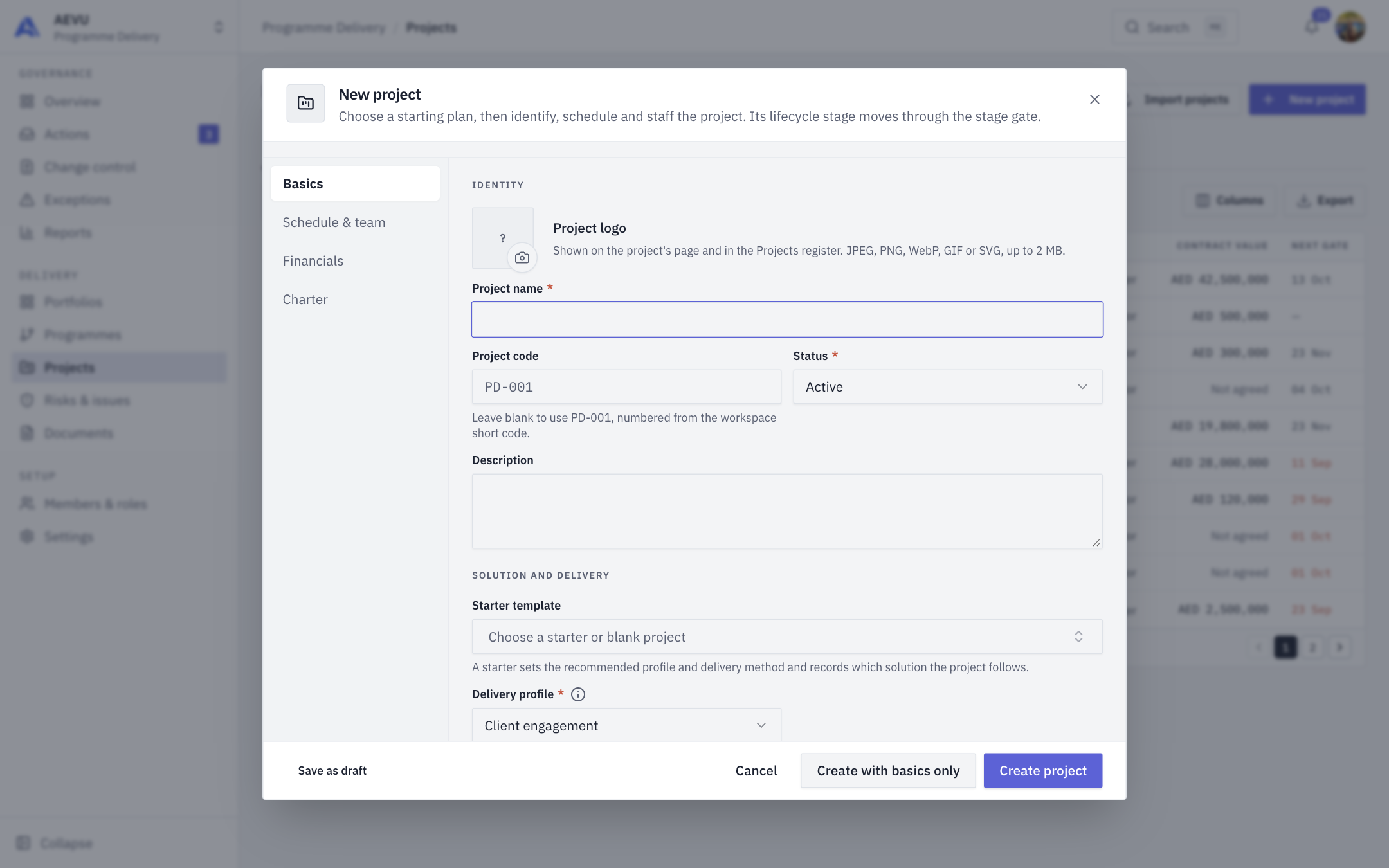
The project form creates a project in four sections: Basics, Schedule & team, Financials and Charter.
Who can use it
You need project.manage. Open the form with New project on the Projects register.
Quick paths
- Create project: saves a full project once required fields are valid. A failed save opens the section with the first error; each section tab shows its error count.
- Create with basics only: fills the schedule with defaults (today to 90 days ahead) and still needs the Basics fields.
- Save as draft: parks the project with its status set to Draft.
Basics
Identity
- Project name (required, 3–200 characters).
- Project code: 2–64 letters, numbers,
_or-, unique in the workspace. Leave blank to have one generated. Documents and reports quote it, so change it with care. - Status and Description.
Solution and delivery
- Starter template: leave as Blank project or pick a starter. A starter sets the recommended delivery profile and method and records which solution the project follows. Its preview shows the pack's scope, Suggested roles and Risks to review. These are prompts only: nobody is assigned and no risks are created. A starter adds no milestones or documents; the plan starts with the project summary milestone and documents come from the portfolio's document template.
- Delivery profile (required; fixed once created):
- Client engagement: work sold to a client. Needs a client and portfolio; contract value, invoices, client payments and delivery notes apply.
- Internal initiative: funded by your own organisation. No client or invoices; an optional planned budget.
- Funded initiative: like internal, paid by a sponsor, with an optional Funding reference (a reference only, not a balance).
Filing
- Client (client engagements): who the work is for. Drives delivery notes and invoices.
- Portfolio: its type decides the document structure the project starts from.
- Programme: appears after you choose a portfolio and lists only that portfolio's programmes. Picking a programme sets the portfolio to match.
- Country, City (pick the country first) and Site code (your own location identifier, used for report filters).
Classification
- Priority, Delivery method (required) and Preferred language.
- Visibility: Private (project members), Team (workspace team members) or Public (everyone in the organisation). It is recorded, but who can open a project is still decided by roles.
- Vendor implementation: Yes or No. Choosing No hides vendor surfaces and is refused while the project has vendor payments.
- Delivery note generation (client engagements): when on, completing an invoicing milestone creates a delivery note before invoicing.
You can also add a project logo under Identity.
Starters
| Pack | Starters |
|---|---|
| Professional services and consulting | Client Delivery Engagement, Service Transition |
| Engineering, construction and real estate | Design and Engineering Package, Fit-out and Handover |
| Manufacturing and industrial improvement | Equipment Installation, Process Improvement |
| Technology and telecommunications | System Implementation, Infrastructure/Network Rollout |
| Retail, hospitality and multi-site expansion | New Location Opening, Location Refurbishment |
| Education and nonprofit programme delivery | Education Programme Launch, Funded Initiative Delivery |
Admins choose which packs are offered in Solution packs. The packs are guidance, not operational systems for those industries.
Schedule & team
- Start date and End date (both required; the end must be after the start).
- Project manager (required; an active Owner, Admin or Manager). A readout shows the manager's existing load plus this project, banded Available (under 70%), Optimal (70–89%), High (90–100%) and Conflict (over 100%).
- Project sponsor, and for client engagements Sales assigned and Presales assigned.
- Team members (shown on the Team card and Workload grid), Finance team (people with the Finance role) and Assign vendors.
Financials
- Contract value (client engagements) or Planned budget (initiatives), and Currency. The sections are headed Contract or Funding depending on the profile. The contract value adds up into the portfolio and programme rollups, so leave it blank until it is agreed; a planned budget is an optional estimate, not revenue or a fund balance.
- Contingency: money set aside for the unforeseen; a change costing more than this goes to finance before it can be approved.
- Profit margin / markup % and Payment terms (days) (required, with the hint "How long the client has to pay an invoice"), client engagements only. Terms are 1–365, default 45.
Charter
Under Why and what: Problem statement, Objectives, Expected benefits, Scope and Deliverables. Under Additional information: Mission, Vision and Goals. Then Project tags (press Enter to add).
WARNING
If your plan has reached its project limit, an upgrade notice appears at the bottom of the form.
Editing later
Edit project (project header menu) opens the same form with Save changes. The delivery profile is fixed once the project is created.
After you create it
The project opens with its stages, folders and gate requirements. Continue with Details and Stage gates, or follow Your first project.