

Appearance
Issues
The Issues tab is the project's issue register. An issue is something that has already happened and needs resolving, as opposed to a risk, which might.
Who can do what
| Action | Permission | Default roles |
|---|---|---|
| View issues | issue.view | Owner, Admin, PMO, Manager, Finance |
| Raise, edit, change status, resolve, link risks | issue.manage | Owner, Admin, PMO, Manager (not Finance) |
| Delete | issue.delete | Owner, Admin |
The screen
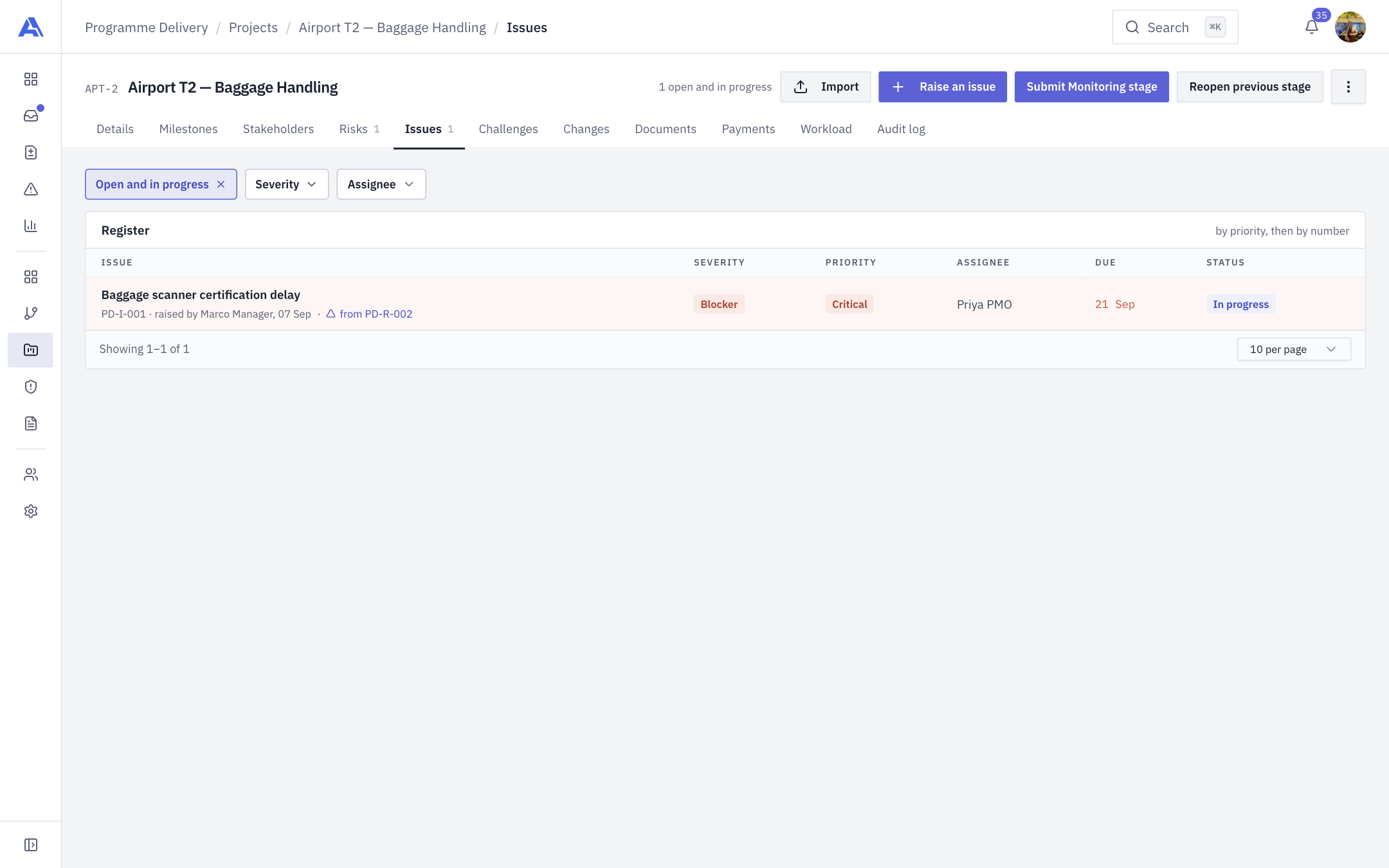
The header shows "N open and in progress". Below it is the Register, ten rows a page, ordered by priority then number, with columns Issue (with its number, who raised it and, for a converted risk, "from PD-R-…"), Severity, Priority, Assignee, Due and Status. It opens filtered to Open and in progress (everything except Resolved and Closed); clear the chip to see settled issues. You can also filter by Severity and Assignee.
Header buttons: Import and Raise an issue.
Issues are numbered per workspace (for example I-014), and numbers are never reused.
Raise an issue
- Click Raise an issue.
- Fill in the drawer and click Log issue.
| Field | Notes |
|---|---|
| Project | Locked to this project on the tab. |
| Title | "What happened?" Start typing to reuse an issue already raised in the workspace. |
| Description | "Something that has already happened, not a risk of it happening." |
| Priority | Low, Medium, High, Critical. |
| Severity | Minor, Major, Critical, Blocker. |
| Assigned to | The project team. |
| Due | Optional. |
| Estimated effort (hours), Actual effort (hours) | Optional. |
Status and resolution
Status has its own control in the drawer, separate from Save Changes. The steps are Open, In progress, In review, Resolved, Closed.
- Open the issue.
- Pick the new status from the Status menu, or click Resolve.
- To reach Resolved or Closed you must write a Resolution ("What was done about it?").
The resolution date is recorded. If you have view-only access the status shows as a chip.
Link risks
The drawer's Risks tab (Linked Risks) shows the risks tied to an issue. You can link or unlink risks, including from the risk side. An issue created by converting a risk starts with that risk linked as its primary. An issue cannot move to another project.
Delete
With issue.delete, open the issue and use its delete action, then confirm. It leaves every register; the audit log keeps the record.
After you save
- An issue past its due date (and not settled) is counted under Needs attention and makes the project At risk on Details.
- Changes are audited.
- A stage can require an issue entry. See Stage gates.
Common mistakes
- Trying to resolve without a resolution. Required for Resolved and Closed.
- Using the register for a possible future problem. That is a risk.