

Appearance
Audit log
The audit log records every decision and change in order, with who made it. It is read-only: there is no edit and no delete, even for the owner.
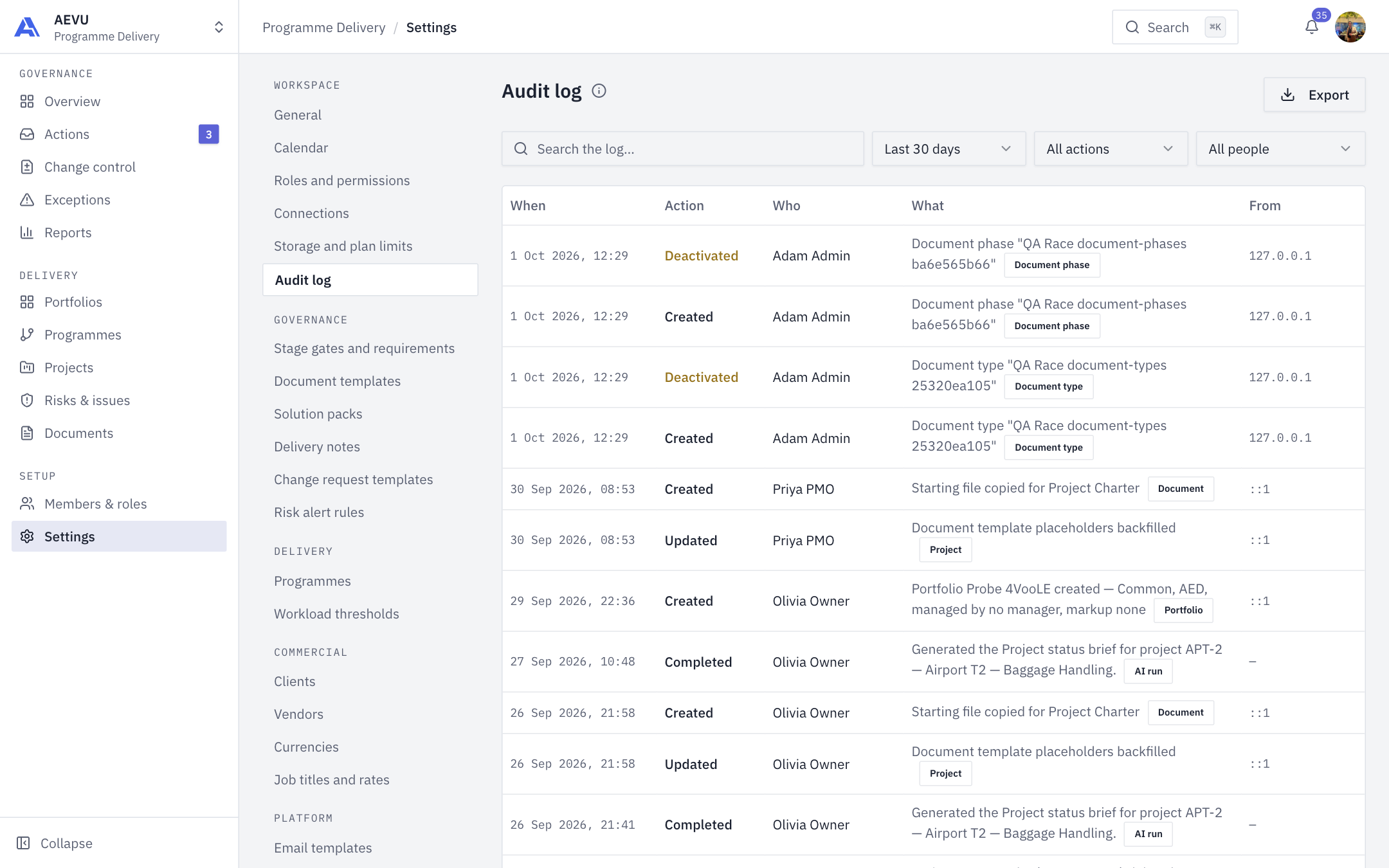
Who can open it: audit.view (Owner, Admin and PMO by default). The log lists entries from the workspaces where you hold that permission. Being Owner adds nothing beyond holding it, and the Owner cannot edit or delete entries either.
Read the log
Columns: When, Action, Who, What (with an entity badge) and From (IP address). Approved shows green, Rejected red, Deactivated and Removed amber. 25 entries show per page.
Entries are written after the change has succeeded, so the log shows what was done, not what was attempted. The person's name is copied onto the entry at the time.
Filter
- Type in Search the log and press Enter. It searches the summary and the person's name.
- Pick a range: last 7, 30 (default), 90 days or 12 months.
- Filter by Action and Person. The dropdowns list only values actually in your log.
Export
Export downloads a CSV of the current filter.
WARNING
Export is capped at the most recent 5,000 entries. If more match, a warning tells you how many were exported. Narrow the range or filters for the rest.
Values starting with =, +, - or @ are prefixed so they can't run as spreadsheet formulas.
Retention and corrections
Retention is deployment configuration, not a workspace setting. A wrong entry is answered with a later entry, never a rewrite.