

Appearance
Projects register
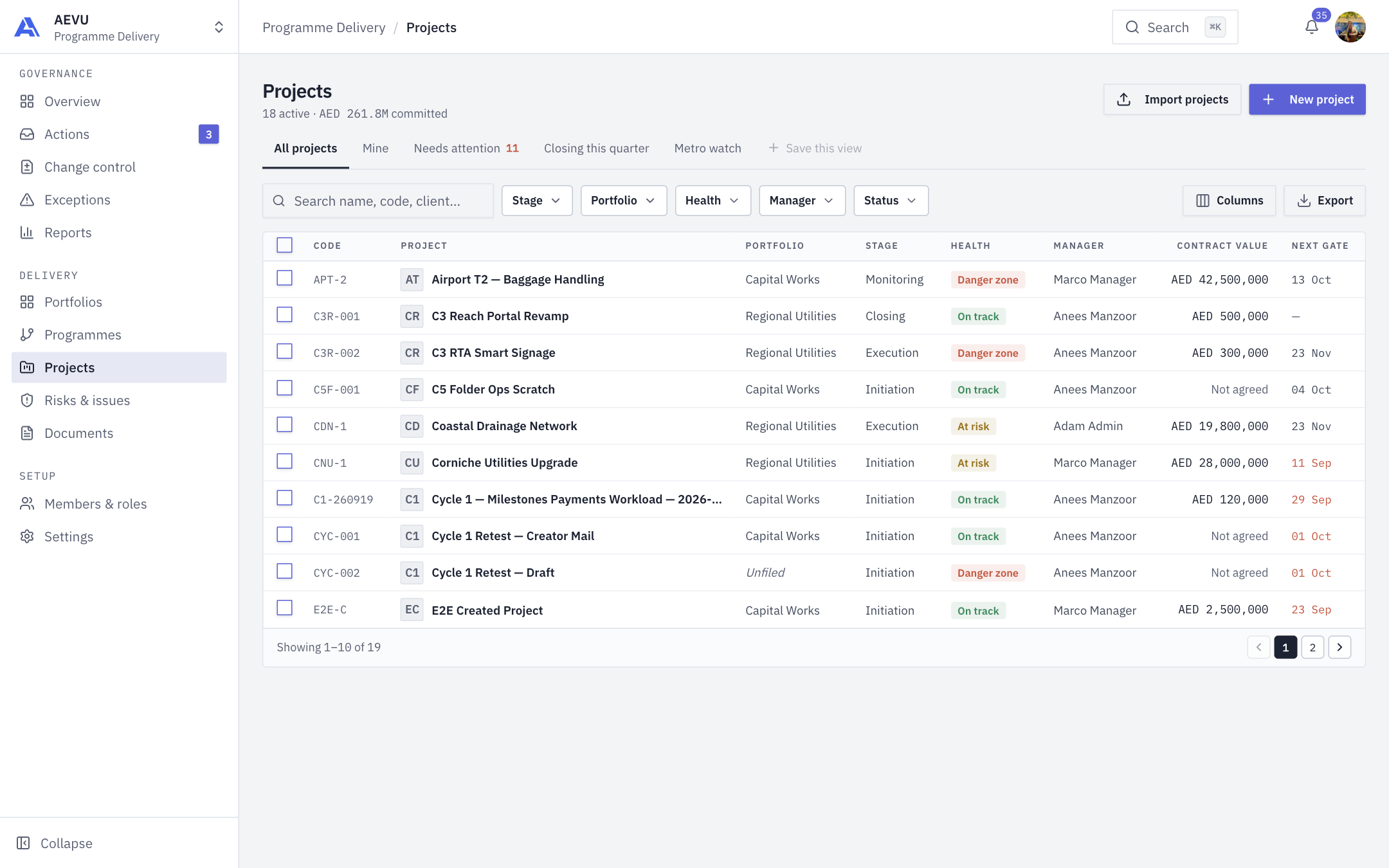
The Projects register lists every project you can see, with health, stage and next gate, and lets you filter, export and act on many at once.
Who can see what
People with project.view_all see every project in the workspace. Others see projects they are on: as manager, sponsor, creator, or on the delivery or finance team. An empty register for them says "No projects of yours yet." Creating needs project.manage.
Views, search and filters
- Tabs: All projects, Mine, Needs attention (health not on track, or a gate pending or rejected) and Closing this quarter (planned finish inside the workspace's current fiscal quarter). Needs attention shows a count; your saved views follow as extra tabs.
- Search name, code, client… searches name, code, description, client, portfolio and manager.
- Filters: Stage, Portfolio, Health, Manager and Status. Several values in one filter mean "any of"; different filters combine.
- Click a column header to sort (ascending, descending, off). Clear resets the filters. Ten rows appear per page.
- A summary line under the title shows active projects and the committed value in the reporting currency (for example "18 active · AED 261.8M committed").
Saved views
Set filters, then click Save this view (it is enabled once a filter is set), name it and Save view. Your views appear as tabs; each has a delete icon. You can keep up to 20, and reusing a name replaces that view.
Columns
The default columns are Code, Project, Portfolio, Stage, Health, Manager, Contract value and Next gate. Use Columns to add Client, Gate, Status, Priority and Finish. Code and Project are locked.
Health
Health is computed each time, never stored:
- Danger zone: an overdue milestone, schedule performance below 0.85, or a rejected gate.
- At risk: schedule performance below 0.95, a gate waiting 5+ days, or an overdue risk or issue.
- Otherwise On track. Completed and Cancelled projects are always on track.
Hover a health chip for the reasons. Next gate is the date the current stage's limit falls, blank when no SLA is set.
For initiatives the client column reads Internal or Funded.
Bulk actions
Select rows with the checkboxes (up to 500), then:
- Change manager: choose a new manager (an active Owner, Admin or Manager).
- Move portfolio: choose a portfolio.
Each project is handled on its own, and ones that cannot change are skipped with a reason (not editable, already that manager, and so on).
Export and import
- Export downloads a CSV of the current filter and columns. With a selection, only those rows.
- Import projects opens the import wizard for new draft projects. See Importing from spreadsheets.
- New project opens the creation form.